When designing industrial equipment, one of the most critical decisions is selecting the right display form factor. Two popular options—open frame and panel mount monitors—each offer distinct advantages depending on your application requirements. This comprehensive guide will help you understand the differences and make an informed decision.
The decision usually comes down to two questions: does the display live inside your own enclosure, and does the front of the display need its own protection against dust or water? The answers to these questions point to one form factor over the other.
Need the whole open frame range in one place? Our Open Frame Monitor Guide compares the LH and LD open frame families — sizes 6.5" to 19", brightness, touch and interface options — alongside panel mount and rack mount alternatives.
What is an Open Frame Monitor?
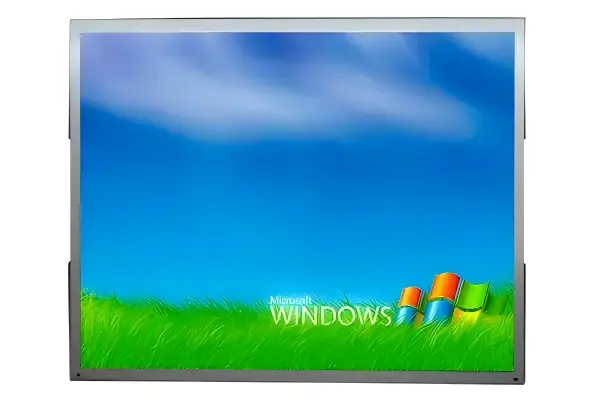
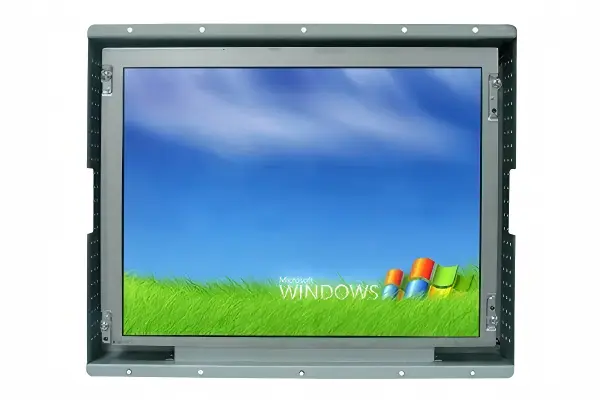
Open frame monitors are designed without an outer enclosure, featuring only the LCD panel, touch screen (if applicable), and a metal mounting frame. This design allows for seamless integration into kiosks, enclosures, and custom cabinets. The open frame design provides flexibility for OEMs and system integrators to incorporate the display into their own housing.
Because there is no finished case, the monitor's electronics and mounting frame are designed to be fixed behind a front panel or inside a machine. Common installation options include VESA mounting holes on the rear frame and front brackets that clamp the display to a panel opening. This makes open frame monitors the standard choice for equipment builders who want to control the final appearance and environmental protection of the finished product.
Key Features of Open Frame Monitors
- Flexible Integration: Easily mounted into custom enclosures or kiosks
- Space-Efficient: Minimal depth requirement behind the mounting surface
- Cost-Effective: No unnecessary enclosure costs for built-in applications
- Customizable: Can be tailored to specific cutout dimensions
- Ventilation: Open design allows for better airflow and heat dissipation
What is a Panel Mount Monitor?
Panel mount monitors are designed with a front bezel and mounting clips or brackets that allow them to be securely mounted into a cutout in a panel or enclosure. These monitors typically feature an IP65 or higher rated front face, making them suitable for wash-down or dusty environments.
The front bezel is the key difference. It seals against the panel cutout with a gasket, so the environment cannot reach the display's electronics through the front. Panel mount monitors are typically supplied as finished, ready-to-install units with the display, touch, and controller integrated, which shortens integration time for buyers who do not want to manage internal mounting and enclosure design.
Key Features of Panel Mount Monitors
- Environmental Protection: IP65/IP66/IP67 rated front face resists water and dust
- Secure Mounting: Robust mounting system prevents vibration loosening
- Professional Appearance: Finished bezel provides a clean, professional look
- Easy Installation: Simple cutout and clip mounting system
- Durability: Aluminum or stainless steel bezel options for corrosion resistance
Comparison Table: Open Frame vs Panel Mount
| Feature | Open Frame | Panel Mount |
|---|---|---|
| Enclosure | No (open back) | Yes (with bezel) |
| IP Rating | IP30 (front only) | IP65+ (front face) |
| Installation | Custom enclosure required | Panel cutout + clips |
| Cost | Lower (OEM integration) | Higher (finished product) |
| Applications | Kiosks, gaming, signage | Marine, food processing, outdoor |
The table summarizes the practical differences. Notice that the open frame monitor is not simply a "less protected" product — it assumes that your enclosure provides the environment and appearance. The panel mount monitor brings its own sealed front face, so it can stand alone against dust, water, and washdown without additional fabrication.
When to Choose Open Frame Monitors
Open frame monitors are ideal for applications where:
- You are building a custom kiosk or enclosure
- Space constraints require minimal depth
- Cost is a primary concern for high-volume OEM projects
- The display will be integrated into existing equipment
- You need flexibility in mounting options
When to Choose Panel Mount Monitors
Panel mount monitors are the better choice when:
- Environmental protection is required (wash-down, dust, moisture)
- You need a finished, professional appearance
- The application involves food processing or pharmaceutical environments
- Marine or outdoor installations require waterproofing
- You want simple, secure mounting without custom fabrication
Making the Right Choice for Your Application
Choosing between open frame and panel mount monitors ultimately depends on your specific application requirements. Consider factors such as environmental conditions, installation constraints, budget, and long-term maintenance needs. Consulting with an experienced industrial display supplier can help ensure you select the optimal solution.
As a final check, confirm the mounting cutout dimensions, the required IP protection level, the touch technology (PCAP, resistive, or IR), and the interface compatibility with your host system before ordering. Small mechanical details — bezel size, gasket material, mounting hole pitch, and rear clearance for cables — are easier to resolve at the specification stage than after integration.
Frequently Asked Questions
Can I use an open frame monitor in a wash-down environment?
Open frame monitors are not recommended for wash-down environments unless properly sealed within a custom enclosure. For wash-down applications, panel mount monitors with IP65+ rating are preferred.
Which is more cost-effective for OEM projects?
Open frame monitors are typically more cost-effective for OEM projects as they eliminate the cost of unnecessary enclosure components when integrating into custom equipment.
Can panel mount monitors be used outdoors?
Yes, panel mount monitors with IP65 or higher ratings can be used outdoors, provided they are properly installed and the installation cutout is properly sealed.
Do open frame monitors support touch screens?
Yes. Open frame monitors are commonly built with PCAP or resistive touch sensors and can be integrated behind a customer's front glass, making them suitable for interactive kiosks.
Related Reading
Need Help Choosing?
Our technical team can help you evaluate your application requirements and recommend the best display solution. Contact us today for expert guidance.
Get Free Consultation